Syed Hasibur Rahman25 min read
Build a Second Brain That Maintains Itself: A Complete Guide to Karpathy's LLM Wiki
Most AI tools that answer questions about your documents rediscover everything from scratch on every query. Andrej Karpathy's LLM-wiki pattern flips that: the AI compiles your documents into a clean, cross-referenced wiki once, then keeps it current — a compounding artifact instead of a goldfish. This is the full build guide, written for people who are not engineers, with every line of code explained.
Open the folder where you keep your work. Go on, actually open it. If you are like most people who have been doing knowledge work for more than a year or two, what you are looking at is an archive nobody designed: a contract from a vendor you half-remember, three versions of a proposal with names like final, final-v2, and final-FINAL-use-this-one, a meeting note from a Tuesday you cannot place, a PDF someone emailed you in the monsoon of a year you would have to check. Each file made perfect sense the day it was written. Together they form a swamp.
And the swamp has a cost. Six months from now you will need to remember exactly what that vendor agreement said about who owns the source code, or why your team chose PostgreSQL over MySQL, or what the second clause of that NDA actually committed you to. And you will do what we all do: open eight files, skim each one, lose the thread, open a ninth, and eventually reconstruct from memory and hope. We have built extraordinary tools for creating documents and almost nothing for remembering what is inside them.
This guide is about a small, elegant fix for that problem — an idea that did not originate with me, but with one of the most consequential thinkers in modern AI. I want to walk you through it properly: who proposed it and why that matters, what makes it genuinely different from the AI document tools you may already have tried, and then — in real, copy-pasteable detail — how to build one yourself, even if you have never opened a terminal in your life. Pour yourself some tea. This one runs long, because the payoff is worth the patience.
Who is Andrej Karpathy, and why should you care what he proposes?
If you have used AI in the last decade, Andrej Karpathy has touched your life whether or not you know his name. He was a founding member of OpenAI, the lab that built ChatGPT. He then spent years as Director of AI at Tesla, where he led the computer-vision team behind Autopilot — the system deciding, millions of times a second, what a car’s cameras are actually looking at. Before all of that he created and taught Stanford’s CS231n, the deep-learning course that an entire generation of practitioners learned from.
But the résumé is not the reason to listen to him. The reason is a rarer talent: Karpathy is unusually good at distillation. He takes something the whole field finds murky and compresses it into a mental model so clean that the industry simply adopts it and moves on. He popularised “Software 2.0” — the framing that a trained neural network is itself a new kind of program, one you grow with data rather than write line by line. More recently he coined “vibe coding,” a phrase that went from a single post to common professional vocabulary in a matter of months. His free teaching projects — micrograd, nanoGPT, the Neural Networks: Zero to Hero series — are, quietly, how a very large fraction of today’s working AI engineers actually learned the craft.
So when Karpathy publishes a short note proposing a new way of doing something, it tends not to be idle speculation. It is more often a preview of where the tooling is about to go. This guide is about exactly one of those notes — a public gist1 in which he sketched a deceptively simple pattern he called the LLM wiki. It is not a product. It is not a company. It is a design, freely given, that a wave of people (myself included) have since built on. By the end of this guide you will have built your own.
The problem with how AI reads your documents today
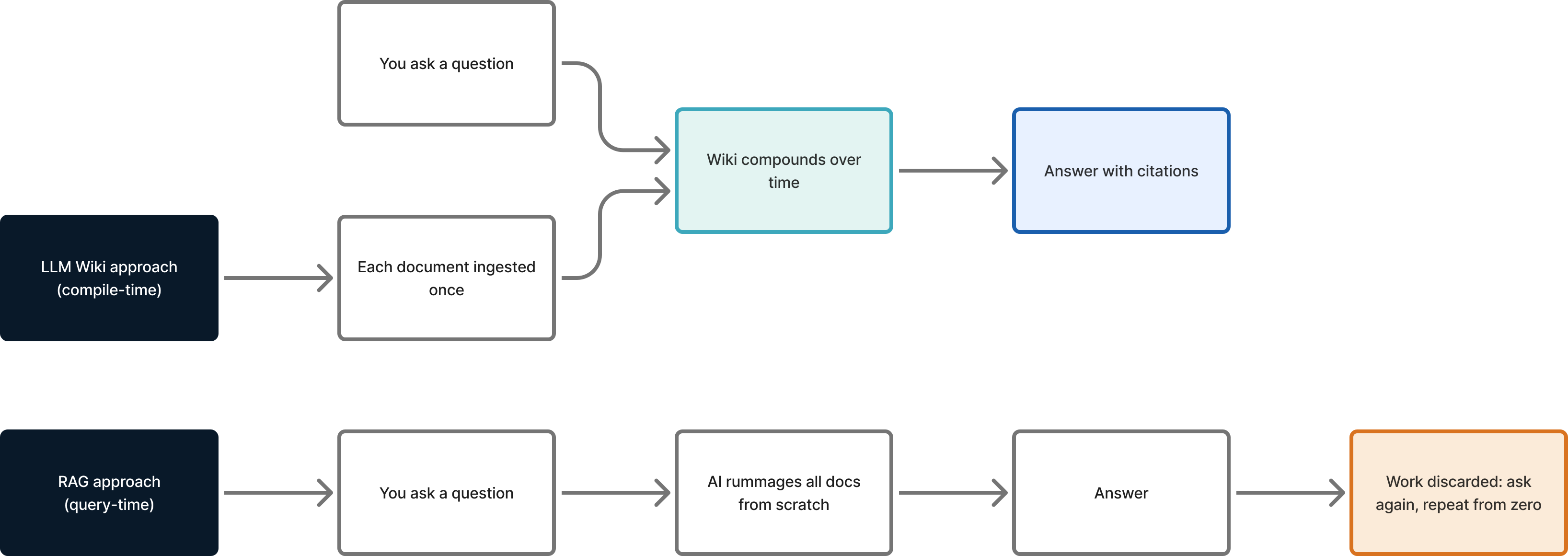
To understand why Karpathy’s idea matters, you have to understand how the current generation of “chat with your documents” tools actually works under the hood. The dominant approach is called RAG — Retrieval-Augmented Generation. The name is jargon but the mechanism is simple. When you ask a question, the system rummages through your documents right then, at that moment, finds the handful of passages that look most relevant, stuffs them into the AI’s context, and asks the AI to answer using them.
This works, and for many tasks it works well. But it has a quiet, structural flaw that Karpathy put his finger on precisely: the AI is rediscovering knowledge from scratch on every single question. Nothing accumulates.1 Ask the same system the same question tomorrow and it performs the entire rummage again, from zero, as if it had never seen your documents before. It is, in the most literal sense, a goldfish — a very intelligent goldfish that forgets the room the instant you look away.
Think about what that means in practice. The first time you ask “which of our vendors has the most aggressive termination clause,” the system reads five contracts, compares them, and gives you an answer. The second time, it reads the same five contracts again. The synthesis you paid for — in time, in compute, in the small tax of waiting — evaporates the moment the answer is printed. There is no artefact. There is no growing understanding. There is only an endless series of fresh starts.
The fix: a wiki that maintains itself
Karpathy’s proposal flips the order of operations. Instead of retrieving and synthesising at query time, you do the synthesis up front, once, and then keep it current as new material arrives. The output of that synthesis is an ordinary wiki — a set of plain markdown files, summaries and topic pages and cross-references — except that no human writes or maintains it. The AI does. As Karpathy frames it, the wiki becomes “a persistent, compounding artifact”1; the human’s job shifts from doing the grunt work to curating the sources and asking the questions, because for an AI “the cost of maintenance is near zero.”
That word — compounding — is the whole game. Every document you add does not just sit in a pile; it gets read, summarised, and woven into what is already there. Related pages get updated. New cross-links get drawn. Contradictions with earlier material get flagged. By the time you ask a question, the comparison has already been made, the contradiction already surfaced, the summary already reflects everything you have ever fed it. You are no longer asking a goldfish. You have built a librarian who has actually read every book you own, remembers all of them at once, and rewrites the card catalogue a little every time a new book arrives.
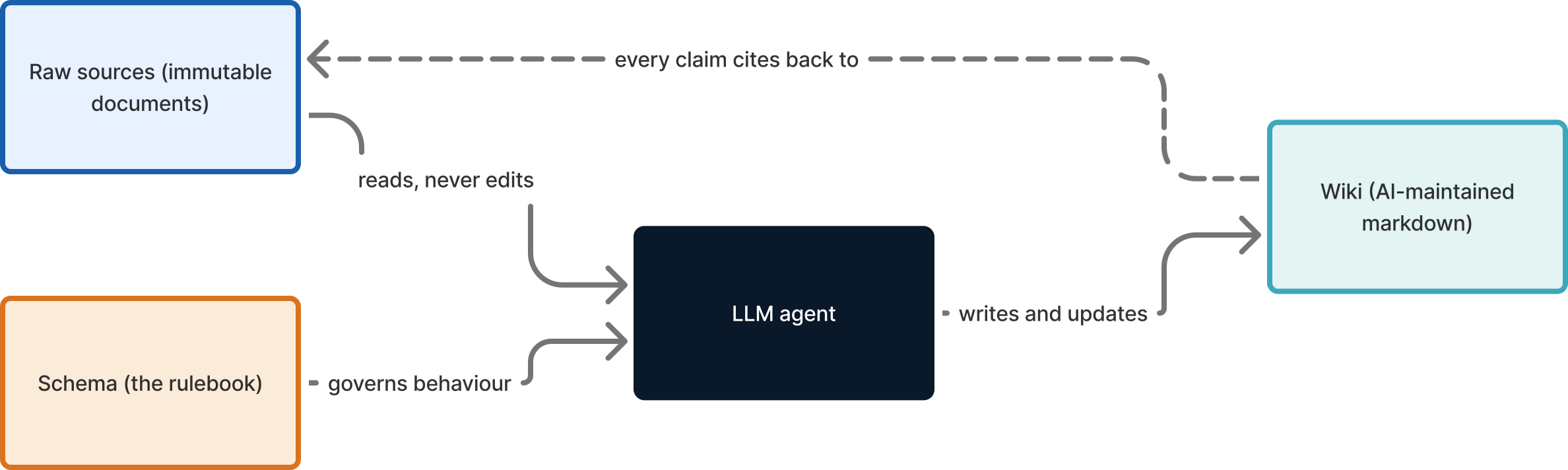
The architecture Karpathy describes has three layers, and they are worth committing to memory because they are the entire design:
- Raw sources. Your real documents. The AI is allowed to read them and is forbidden from ever modifying them. They are immutable, full stop.
- The wiki. The markdown pages the AI writes and continuously maintains. This is the layer you read and trust.
- The schema. A short rulebook — itself just a document — that tells the AI how to structure the wiki, what a page must contain, and what it is never permitted to do.
Three layers, three operations. Karpathy names them, and they map cleanly onto the three things you will actually do:
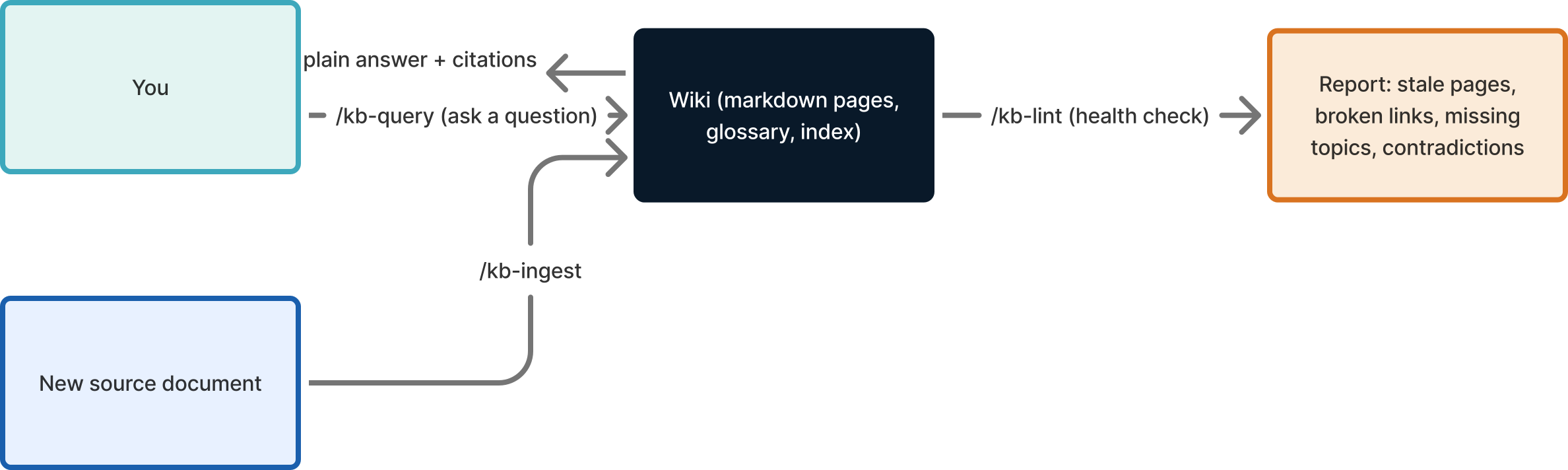
- Ingest — hand the AI a new source; it reads, summarises, integrates, and updates everything related.
- Query — ask a question; it answers from the wiki and cites the pages it used.
- Lint — health-check the whole thing; it reports stale summaries, broken links, missing topic pages, and unresolved contradictions, without fixing anything behind your back.
Everything that follows in this guide is a faithful, working implementation of those three layers and three operations. Let us build it.
Why a non-technical person should care
Before the build, let me be concrete about who this is for, because “build a wiki” sounds like an engineer’s chore and it is not. If you run a small firm, manage projects, study at university, handle contracts, or simply accumulate documents faster than you can remember them, here is what this buys you in plain terms.
One place to ask instead of ten places to search. You type a question in ordinary language and get an answer with links to the exact documents it came from. No guessing which folder, no opening eight PDFs.
Summaries so you never re-read. Every document is reduced to one sentence of “what it is” plus the handful of facts that actually matter. Thirty seconds replaces thirty pages.
Connections you would never draw by hand. When two documents mention the same person, product, or system, the AI gives that topic its own page and links to every place it appears. Relationships that were invisible across separate files become a map.
It catches the contradictions you would miss. Real documents disagree with each other constantly — a company named two different ways across one contract, a price quoted differently in the proposal and the invoice. The system surfaces these instead of silently averaging them. This is the feature that earns its keep, because a missed contradiction is how a small mistake becomes an expensive one.
Your originals are physically safe. The AI reads your files but writes its wiki somewhere completely separate. By design — and we will see the exact mechanism — it cannot corrupt or overwrite the documents you care about.
And crucially: every claim is checkable. Unlike pasting a document into a chatbot and trusting the reply, every answer here points back to a real source page, which points back to your real file. Trust, but verify — and verifying takes one click.
What you will need
Three things, two of them free, one of them a modest subscription.
- A terminal. This is the text-command window every computer has. On a Mac, press
Cmd+Space, type “Terminal,” and press Enter. On Windows, install Windows Terminal or use WSL. You will paste a handful of commands into it. You do not need to understand them deeply; I will explain each. - Claude Code. Anthropic’s command-line AI tool. It is the engine that reads your documents and writes the wiki. It runs the whole thing beautifully because it can read files, write files, and follow a rulebook. (This pattern works with other agentic AI tools too, but I will use Claude Code because it is what I use daily.)
- Obsidian, optional but recommended. A free note-taking app that opens a folder of markdown files and — this is the magic part — draws a graph of how they link together. Point it at your finished wiki and you can literally see your knowledge as a constellation of connected dots.
If you can install a normal application and copy-paste a line of text, you have every skill this requires.
Step 1 — Make the two folders
Open the terminal and paste this, then press Enter:
mkdir -p ~/projects/kb/raw ~/projects/kb/wiki
cd ~/projects/kb
Two commands. mkdir -p means “make these folders” (the -p just stops it complaining if a parent folder is missing). cd means “change directory” — step inside. You are now standing inside a folder called kb (for “knowledge base”) in your projects directory, and it contains the two layers from Karpathy’s design: raw/ and wiki/. The third layer, the schema, is a file we write next.
Step 2 — Understand the symlink safety trick
This is the single most important idea in the whole setup, so I am giving it its own step.
raw/ will not contain copies of your documents. It will contain symlinks — what techies call symbolic links and what you already know, in everyday life, as shortcuts. When you put a shortcut to a file on your desktop, double-clicking it opens the real file, but the shortcut itself is not the file; deleting the shortcut does nothing to the original. A symlink is exactly that, at the level of the file system.
Why does this matter? Because it is the mechanism that makes the immutability promise real rather than aspirational. The AI works against raw/, which is full of shortcuts pointing out to your real documents wherever they actually live. The AI reads through the shortcut; it never holds the original. Combine that with one hard rule — “never modify anything in raw/” — and your source documents are protected by design, not by good behaviour. Even a confused AI cannot scribble on a file it only ever sees through a read-only pointer.
You create a symlink like this (you will not usually do it by hand — a script does it — but here is the shape):
ln -s "/Users/you/Documents/contract.pdf" ~/projects/kb/raw/contract.pdf
ln -s makes the link. The first path is the real file; the second is the shortcut that now lives in raw/. Open the shortcut and you get the contract; the contract itself never moved and never changed.
Step 3 — Write the schema (the rulebook)
This is layer three of Karpathy’s design and the brain of the operation. It is an ordinary markdown file named AGENTS.md that the AI reads at the start of every run. It tells the AI where things go, what a good page looks like, and — most importantly — what it must never do. Create the file in ~/projects/kb/ and paste this in:
# Knowledge Base — Schema and Behaviour

Skills MUST read this file at the start of every run.

## Layout
- raw/   : symlinks to source files + a manifest. NEVER edit anything here.
- wiki/  : AI-owned generated pages, organised by namespace (one per project).
  - index.md     : table of contents, regenerated every run
  - glossary.md  : every term, alphabetised
  - log.md       : append-only diary of every operation

## A "source" page (one per ingested document) must contain, in order:
1. What it is — one sentence
2. Why it exists — the motivation; mark guesses as *(inferred)*
3. Key claims — bulleted facts other pages can rely on
4. Open questions / contradictions — anything unclear or conflicting
5. Links — to related pages and to the original in raw/

## A "concept" page (a recurring topic) is created when:
- A term is cited by 2 or more source pages, OR
- A saved query promotes it.

## Wikilinks
Use Obsidian-style [[double-bracket]] links between pages.

## Hard rules (non-negotiable)
- Never modify anything in raw/.
- Never delete wiki pages. Report problems; let the human remove.
- Never auto-save to version control. Show a summary; the human commits.
- Ingest exactly ONE source per run. Reject multi-file requests.
- Always regenerate index.md and append to log.md.
Read those hard rules carefully, because they are the difference between a tool you trust and a tool you fear. The AI cannot quietly delete your work. It cannot rewrite ten files in a burst and leave you unable to tell what changed. It does one document at a time, shows you the result, and waits for your approval. This is not a limitation that got left in by accident; it is the design choice that keeps a powerful, occasionally-overconfident assistant on a short and visible leash.
Step 4 — A small script to find your documents
Now we need to tell the AI which documents exist. This is the only piece of real code in the guide, and you do not need to read it line by line — you need to understand what it does, which is: walk through every project folder, find every markdown and PDF file, and write them into a list (a “manifest”). Save this as scripts/find-docs.sh inside your kb folder:
#!/usr/bin/env bash
# Lists every .md and .pdf under ~/projects/ into a manifest the AI reads.
set -euo pipefail

KB="$HOME/projects/kb"
PROJECTS_ROOT="$HOME/projects"
MANIFEST="$KB/raw/MANIFEST.yaml"

# Top-level folders to skip (the kb itself, build junk, etc.)
SKIP=("kb" "_build")

echo "# generated by find-docs.sh" > "$MANIFEST"
echo "sources:" >> "$MANIFEST"

for dir in "$PROJECTS_ROOT"/*/; do
  name=$(basename "$dir")
  case " ${SKIP[*]} " in *" $name "*) continue;; esac

  find "$dir" -maxdepth 5 -type f \( -name '*.md' -o -name '*.pdf' \) \
    -not -path '*/node_modules/*' -not -path '*/.git/*' | while read -r file; do
    printf '  - namespace: "%s"\n    real_path: "%s"\n' "$name" "$file" >> "$MANIFEST"
  done
done

echo "Done. Your documents are listed in $MANIFEST"
The clever part is the loop in the middle. It treats every top-level folder under ~/projects/ as its own “namespace” — its own labelled section of the wiki — automatically. Your aice-lab folder becomes the aice-lab namespace; a university folder becomes the university namespace; and so on. Drop a brand-new project into ~/projects/ next month, re-run the script, and it is included with zero configuration. The SKIP list lets you exclude folders you do not want indexed, and the -not -path filters keep out the noise (the thousands of library files in node_modules, the internals of .git).
Make it runnable and run it:
chmod +x scripts/find-docs.sh   # one-time: grant permission to run
./scripts/find-docs.sh
You will see something like Done. Your documents are listed in .../MANIFEST.yaml. Open that file and you will find a tidy inventory of everything the AI could ingest, each entry tagged with its namespace and the real path to the file. This manifest is also where, over time, you can mark which documents have already been processed.
Step 5 — Wire up the three operations
Claude Code lets you define reusable shortcuts called slash commands (it stores them as small markdown files, one per command). We will make three, matching Karpathy’s three operations. Each is just a short instruction file that tells the AI what to do; the schema in AGENTS.md supplies the rules.
Create ~/.claude/commands/kb-ingest.md:
Read AGENTS.md first. Then ingest exactly ONE source: $ARGUMENTS

1. Create a symlink to the source under raw/<namespace>/ if not present.
2. Read the source in full.
3. Write wiki/<namespace>/sources/<slug>.md following the source schema.
4. If any term is now cited by 2+ sources, create its concept page.
5. Flag contradictions with existing pages in the new page's
   "Open questions / contradictions" section.
6. Regenerate index.md and append a dated entry to log.md.
7. Print a summary of every file changed. Do NOT commit.
Create ~/.claude/commands/kb-query.md:
Read AGENTS.md first. Answer this question from the wiki only: $ARGUMENTS

- Cite every source page you used with [[wikilinks]].
- If the wiki cannot answer, say so plainly — do not guess.
- Offer to save the answer as wiki/<namespace>/analyses/<slug>.md.
Create ~/.claude/commands/kb-lint.md:
Read AGENTS.md first. Health-check the wiki and REPORT ONLY (fix nothing):

- Sources whose underlying file changed since last ingest (stale).
- Broken symlinks in raw/.
- Wiki pages no longer linked from anywhere (orphans).
- Terms cited by 2+ sources that lack a concept page.
- Unresolved items in any "Open questions / contradictions" section.
- Drift between index.md / glossary.md and the actual pages.
Append a dated summary to log.md.
That is the entire system. Two folders, one schema, one discovery script, three short command files. Everything else is conversation.
Step 6 — Use it
Start Claude Code inside your kb folder:
claude
Now you simply talk to it. To ingest a document:
/kb-ingest ~/projects/acme/docs/vendor-agreement.pdf
The assistant reads the agreement, writes a clean summary page, notices that “the vendor” and a particular payment system show up in ways worth their own pages, updates the table of contents, appends a line to the diary log, and then — because the schema forbids silent action — prints exactly what it changed and waits for your nod.
To ask a question across everything it now knows:
/kb-query "what does the vendor agreement say about who owns the source code?"
You get a plain-language answer with citations to the source page, so you can click straight through to verify against the original. And to keep the whole thing healthy as it grows:
/kb-lint
If wiring up three command files feels like a lot on day one, skip it entirely. You can get most of the value just by talking to Claude in plain language: “Read this document, write me a one-page summary with the key facts and anything that looks contradictory, save it in my wiki folder, and never touch my original.” The commands simply make that repeatable and consistent, which is what turns a clever trick into a system you actually keep using.
What the output actually looks like
Theory is cheap; let me show you the artefact. Here is a representative (anonymised) source page the system generates from a vendor contract:
---
type: source
namespace: acme
raw_path: raw/acme/vendor-agreement.pdf
ingested: 2026-05-30
---

## What it is
A 14-page software-development agreement between a vendor and a client,
under Bangladesh law, for a fixed price covering three deliverables.

## Why it exists
To define scope, payment, ownership, and warranty for an outsourced
build — and to set the terms under which the relationship can end.

## Key claims
- Fixed price; payment split 50/50 across two milestones.
- Client owns all developed software once each phase is accepted.
- 6-month warranty, then a 10% annual maintenance fee.
- Disputes fall under the exclusive jurisdiction of the courts of Dhaka.

## Open questions / contradictions
- Page 1 names the vendor "Tech Limited"; section 1.11 defines it as
  "Consultancy Limited" — unreconciled. A later technical document
  leans toward the section 1.11 name.
- "Acceptance" is the trigger for ownership transfer but is never
  defined anywhere in the document.

## Links
### Concepts
- [[acme/concepts/developed-software]]
- [[acme/concepts/annual-maintenance-contract]]
### Original
[raw/acme/vendor-agreement.pdf](../../../raw/acme/vendor-agreement.pdf)
Look hard at the “Open questions / contradictions” section, because that is where the system earns its keep. A human skimming a fourteen-page PDF would almost certainly miss that the vendor is named two different ways across the same contract, and would probably not notice that the word “acceptance” — the legal trigger for who owns the code — is used four times and defined zero times. The AI caught both. Those are precisely the details that, left unnoticed, turn into a dispute eighteen months later when the relationship sours and everyone reaches for the contract at once.
And because terms cited by two or more sources automatically earn their own page, you accumulate a layer of concept pages over time — “Developed Software,” “Annual Maintenance Contract,” each one collecting every place the idea appears across all your documents, with links in both directions. Open the whole thing in Obsidian and these concept pages show up as the bright, densely-connected hubs in the graph: the load-bearing ideas of your entire archive, surfaced automatically, by frequency, without anyone deciding in advance what mattered.
How I actually use it, day to day
Let me make this concrete with my own workflow, because the abstract description undersells it. New material arrives constantly — a meeting note, a fresh spec, a handover document from a departing contractor, a signed agreement. As each one lands in its project folder, I ingest it. That is a thirty-second action with a ten-second wait, and then it is permanently part of the wiki.
When I need to remember something, I no longer open files. I ask. “Which of our hosting providers did the architecture audit flag as a single point of failure, and what was the recommended fix?” The answer comes back in prose, with links, and if I doubt it I click through to the source page and from there to the original document in two clicks. When I am about to start a new piece of work, I run a query to assemble everything the wiki already knows about that area, and I read the synthesis instead of hunting through history.
Once a week or so, I run the lint. It tells me which summaries have gone stale because the underlying document changed, which links broke because a file moved, which recurring term has quietly earned a concept page it does not yet have. I fix what matters and ignore what does not. The wiki does not rot, because something is always watching it rot and telling me where.
The effect compounds in a way that is hard to feel until you have lived with it for a month. The first week, it is a slightly nicer way to summarise documents. By the second month, it is the first place I look for anything, because it knows more, in a more connected way, than I can hold in my own head — and unlike my head, it cites its sources.
Where this beats the tools you have already tried
You may be thinking: I can already paste a PDF into ChatGPT, or use one of the “chat with your docs” products, or Google’s NotebookLM. Why this?
The honest answer is that those tools are excellent for what they are, and what they are is query-time tools — variations on the RAG pattern, brilliant goldfish. They shine when you have a document in front of you right now and a question about it right now. Where they fall down is accumulation. Close the tab and the understanding is gone; the cross-references were never written down anywhere durable; the contradiction the model noticed in passing was never recorded. Ask again next month and the work happens again from zero.
The LLM-wiki is a compile-time tool. The synthesis is done once and written to disk as plain, portable, human-readable markdown that you own outright — no proprietary format, no vendor lock-in, no subscription required to read your own notes. It works in any text editor, lives in any folder, and can be backed up, version-controlled, or opened in Obsidian for the graph view. The knowledge compounds instead of evaporating. That is the trade: a little more setup and discipline up front, in exchange for an artefact that gets more valuable every time you touch it rather than resetting to zero.
The honest caveats
I would be doing you a disservice to oversell this, so here is the calibrated version.
It is only as good as your documents. Garbage in, garbage summarised. The system organises and cross-references; it does not launder bad source material into good. What it does do, even with messy inputs, is make the mess navigable — which is itself a real gain.
You must spot-check. The AI occasionally gets things wrong, the way every AI does. The citations exist precisely so this is cheap to catch: every claim points to a source page, every source page to an original file. The discipline is simple — trust, but verify, and the verifying is one click. Treat the wiki as an extremely well-read assistant whose work you sign off on, not as an oracle.
The first big ingest costs time and a little money. Reading and summarising hundreds of documents is real work, and AI usage is metered. Do the important documents first; let the long tail wait. There is no rule that says the wiki must be complete to be useful — mine was useful at three documents.
It keeps you in the loop by design, which means it is not fully automatic. It will not commit, delete, or run unattended without your say-so. For some people that is friction. For me it is the entire point: I would rather approve ten small changes than discover one large surprise.
Why this matters here, in Bangladesh
I write from Bangladesh, so let me bring it home. We have something like three-quarters of a million ICT professionals and several thousand IT firms, most of them small, most of them running on thin margins and institutional memory that lives in a handful of senior people’s heads. When one of those people leaves, the memory leaves with them. We have all watched a project stall because the one person who understood the vendor contract, or the deployment quirk, or the reason behind a decision, simply moved on and took the context with them.
A self-maintaining wiki is an unusually good fit for that reality, for three reasons. First, it is cheap: plain markdown files, a free editor, and a metered AI bill that scales with use rather than a fixed enterprise license most small firms cannot justify. Second, it institutionalises memory that currently walks out the door — the contract terms, the architecture decisions, the handover notes become a durable, queryable artefact that outlives any individual. Third, and quietly important, the output is yours, on your own disk, in an open format. In a year when so much of the global conversation is about digital sovereignty and dependency on infrastructure owned elsewhere, there is something to be said for a knowledge base that is a folder of text files you fully control — even if the AI that helped write it is rented.
For a student, the same logic applies at a smaller scale: every course’s readings, notes, and past papers, ingested across a semester, become a tutor you can interrogate the night before an exam — one that cites the exact lecture note its answer came from. For a freelancer juggling several clients, each client is a namespace, and the wiki keeps their worlds neatly separate and individually searchable. The pattern scales down to one person and up to a small organisation without changing shape.
Start small
You do not need to organise your entire digital life this weekend, and you should not try. Pick one project — the one whose documents you most dread re-reading. Make the two folders. Write the schema. Ingest three files. Ask one real question and watch the answer come back with citations you can click. That is the whole experiment, and it takes an evening.
Mine indexes thousands of documents now, across every project I touch, and it is the first place I look for almost anything. But it started exactly the way I am suggesting you start: with a single contract I was tired of re-reading, and a short note from a person who has a long, reliable habit of seeing where this technology is going before the rest of us do. When Andrej Karpathy sketches something this simple, it is usually worth building. This one was — and the building, as you have just seen, is genuinely within reach for anyone willing to spend one patient evening on it.
The swamp is not going to drain itself. But for the first time, you can hand the draining to something that does not mind the work, never forgets what it found, and shows you exactly where it looked.
The original idea comes from Andrej Karpathy’s public LLM wiki gist. A shorter version of this guide is published on Medium and links back here for the full walkthrough.
Andrej Karpathy — LLM wiki (GitHub gist). The original sketch of the pattern: immutable raw sources, an LLM-maintained wiki, and a schema; the framing of the wiki as “a persistent, compounding artifact” and the observation that with RAG “the LLM is rediscovering knowledge from scratch on every question.” ↩︎ ↩︎ ↩︎